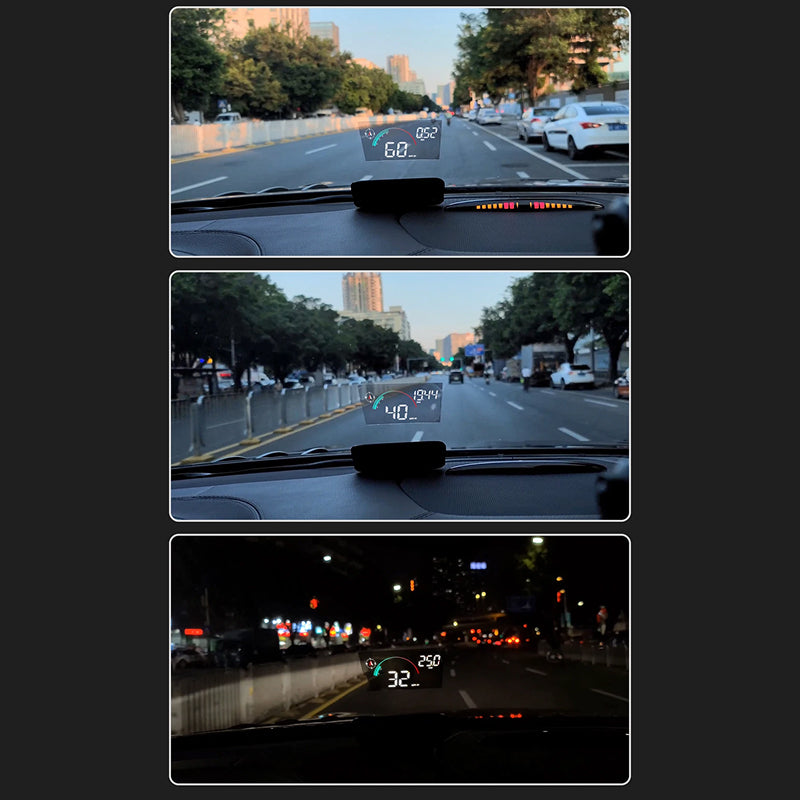
Engineered for Distraction-Free Driving
Eyes Stay on the Road
NavBeam projects speed and GPS onto your windshield, in your direct sightline. HUD drivers report 70-90% fewer phone and dash glances per commute.
Fits Every Vehicle You Drive
From electric cars to motorcycles and commercial trucks, NavBeam installs without modification. One device, any vehicle.
One Crisp Image Instead of Double Vision
The included reflective film aligns your view into a single sharp projection, not the overlapping double image budget HUDs are known for.
Ready to Drive in Minutes
No wiring, no mechanic, no manual required. Connect NavBeam and start driving in under five minutes.
What our 17,000+ Customers say
Based On Real and Honest Experiences
Frequently Asked Questions
How hard is it to install NavBeam?
It's plug-and-play. Press the film onto a clean, dry windshield from the center outward to avoid air bubbles, then connect NavBeam to your USB port or lighter socket. Setup takes about five minutes.
Will NavBeam work with my car?
Yes. NavBeam runs on GPS, so it works with electric vehicles, hybrids, petrol cars, motorcycles, and commercial vehicles without any OBD2 connection. An OBD adapter is included for cars that support extra vehicle data, but it's optional, not needed.
Can I actually see the display in bright sunlight?
Yes. NavBeam's automatic brightness adjustment keeps the projection crisp and readable in direct sun or total darkness, and the integrated hood design cuts glare so information stays sharp in your line of sight.
Does NavBeam drain my car battery?
No. NavBeam powers on automatically with your ignition and shuts off when you park, drawing energy only through your USB connection. There's zero standby power draw when your car is off.
How accurate is the GPS tracking?
Very accurate. NavBeam uses dual-mode positioning paired with a 10Hz refresh rate, so your speed and location update in real time with virtually no lag, even in tricky signal environments.
Does NavBeam work with polarized sunglasses?
Most polarized lenses won't block the projection since NavBeam's automatic brightness and contrast adjust to compensate. On a few extreme polarized angles you may need to tilt your head slightly for a clear view.
What if I'm not happy with NavBeam after purchase?
You're covered by our 90-day money-back guarantee. If NavBeam doesn't meet your expectations, our support team will process a hassle-free, no-questions-asked return.
Why do I see a double image or ghosting on my windshield?
The reflective film is what keeps the image sharp, so make sure it's applied to a clean, bubble-free spot of glass directly in your sightline. Positioned correctly, NavBeam shows one crisp image instead of the double image cheaper HUDs are known for.